
Описание
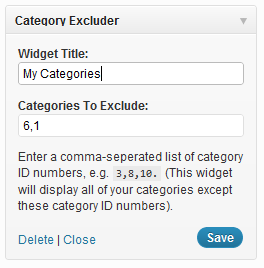
A simplistic plugin that allows for the furthur customization of your category list. This will allow you to create a custom category list which will show the categories you want, and will hide the categories you do not want. For example, say you have a particular category you don’t want to be displayed named „Announcements“. You can use this plugin to display all of your other categories, except the category „Announcements“. You are not limited to just excluding one category; you can exclude multiple categories. Essentially, this plugin provides more functionality to your category list.
Снимки на разширението

Инсталиране
- Upload the *.zip copy of this plugin into your WordPress through your ‘Plugin’ admin page.
- Activate the plugin through the ‘Plugins’ menu in WordPress
- Place the widget in your desired sidebar through the „widgets“ admin page
ЧЗВ
- How do I find the category ID number?
-
First go to your Posts > Categories in the administrator part (wp-admin) of your WordPress site. Click the category you desire to find its ID. Its ID number should then be displayed in the URL section of your browser. (It should say $tag_ID= followed by your category ID number.
Отзиви
There are no reviews for this plugin.
Сътрудници и разработчици
“Category Excluder Widget” е софтуер с отворен код. Към разширението са допринесли следните хора:
Сътрудници
Превеждане на “Category Excluder Widget” на вашия език.
Имате интерес към разработване?
Преглеждане на кода, разглеждане на SVN хранилище, или абонамент към програмната история (log) чрез RSS.
Списък с промени
1.1
- Fixed minor ID issue
1.0
- Initial Release