
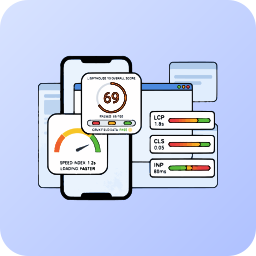
Описание
Is your WordPress site failing Core Web Vitals and losing SEO rankings? Slow load times, layout shifts, and delayed interactivity can ruin user experience and hurt your Google search visibility.
Meet Mega Performance Monitor – a lightweight but incredibly powerful performance utility built to bring real-time Lighthouse 10 metrics and automated optimizations to your site.
I built this plugin to simplify performance optimization. With Mega Performance Monitor, you can automatically fix your Core Web Vitals without touching a single line of code.
🔥 Premium Performance… But for FREE! 🔥
Why pay for expensive speed optimization plugins? We give you the tools you need to pass Core Web Vitals absolutely FREE:
* Real-time Lighthouse 10 Integration: Fetch lab and field data for both Mobile and Desktop directly from Google.
* Automatic Performance Engine: Fix DNS prefetching, font-display, and script loading with one click.
Why You Need Performance Monitoring
👉 Pass Core Web Vitals: Deep monitoring of LCP (Loading), CLS (Stability), and INP (Interactivity) with color-coded status badges.
👉 Improve SEO Rankings: Google uses page speed as a ranking factor. Faster sites rank higher.
👉 100% Cloud-Powered: All performance analysis is securely offloaded to our cloud API, so your server never slows down.
🚀 Everything You Get for Free
- One-Click Performance Engine: Activate smart asset caching and render-blocking fixes instantly.
- Image Optimization Toolkit: Automatically serve WebP formats, inject missing dimensions, and preload hero images (Fixes LCP & CLS).
- Script Optimization: Postpone the execution of third-party trackers until user interaction (Fixes INP).
- Detailed Health Metrics: Track FCP, Speed Index, Total Blocking Time (TBT), and Time to First Byte (TTFB).
- Field Data (CrUX) Assessment: See if your actual users are experiencing a „Pass“ or „Fail“ based on 28-day real-world data.
⚡ Need More Power? (Mega Performance Monitor Pro)
For power users and agencies, our Pro version adds:
- Automated Background Scans: Schedule hourly or daily performance audits.
- Advanced Asset Minification: Deep JS/CSS minification and combination.
- Critical CSS Generation: Automatically generate and inline Critical CSS for lightning-fast First Paint.
- Database Optimization Engine: Integrated database sweep capabilities.
✨ Take control of your site speed today! Learn more about Pro here.
🛡️ Safe, Secure, and Hub-Connected
This plugin connects directly to the Mega Plugin Hub dashboard, allowing you to manage your optimization settings remotely. It’s perfect for developers managing multiple client sites. All data sync happens securely via webhooks.
External services
This plugin relies on external third-party services and APIs to provide licensing, performance analysis, and settings synchronization features. By using this plugin, you agree to their respective terms and privacy policies:
- Mega Plugin Hub (API: https://api.megapluginhub.com)
- Usage: Used to verify your license key, sync plugin settings, and trigger remote performance scans.
- Data Sent: Sends your license key and plugin settings. Fetches Lighthouse data via Google PageSpeed API.
- Terms & Privacy: Terms of Service | Privacy Policy
Privacy Policy
Mega Performance Monitor is committed to transparency regarding user data:
- License & Settings sync only – Only your license key and optimization settings are sent to Mega Plugin Hub for verification and sync.
- No local UI bloat – All configurations are managed remotely, keeping your WordPress admin fast and clean.
- Activation popup (optional) – If you enter your email in the welcome popup, it is saved to your site’s
wp_optionstable only. It is never sent to any third-party server.
Credits
Developed with ❤️ by MegaWix Technologies
- Plugin Development: MegaWix Technologies
- Testing & QA: MegaWix Technologies
Support
Need help? Have a question or feature request?
- Website: https://www.megapluginhub.com
- Email: support@megapluginhub.com
We are committed to providing reliable support and regular updates to ensure this plugin remains compatible with the latest WordPress versions.
Снимки на разширението


Инсталиране
Automatic Installation
- Go to WordPress Admin Plugins Add New
- Search for Mega Performance Monitor
- Click Install Now Activate
- Look for Core Web Vitals in your left sidebar menu!
Manual Installation
- Download the plugin ZIP file.
- Go to Plugins Add New Upload Plugin.
- Select the ZIP and install.
- Click Activate Plugin.
Initial Setup
- Open Core Web Vitals from your WordPress sidebar.
- Enter your Mega Plugin Hub License Key to connect.
- Your settings will automatically sync.
- Run your first performance scan and enjoy a faster site!
ЧЗВ
-
Does this plugin affect my site’s server speed?
-
No, it actually makes it faster! Unlike other heavy plugins, Mega Performance Monitor acts as a lightweight bridge. All the heavy performance analysis and Lighthouse 10 scans are securely offloaded to our cloud SaaS hub, meaning your server’s resources are never drained.
-
Do I need coding skills to optimize my site?
-
Not at all. We built this plugin to simplify performance optimization. You can automatically fix your Core Web Vitals, optimize fonts, and fix render-blocking scripts with just one click—without touching a single line of code.
-
What are Core Web Vitals and why should I care?
-
Core Web Vitals are a set of metrics (LCP, CLS, INP) that Google uses to measure the user experience of your website. Passing these metrics is critical because Google uses them as a direct ranking factor for SEO. Faster sites rank higher.
-
Is the performance data real-time?
-
Yes. When you trigger a scan from the Mega Plugin Hub dashboard, it fetches live, up-to-the-minute lab and field data (CrUX) using the official Google Lighthouse 10 engine.
-
Does it support both Mobile and Desktop analysis?
-
Yes, the tool fully supports both mobile and desktop environments. You can easily toggle between the two to see exactly how different users experience your site.
-
Will this conflict with my existing caching plugin?
-
Mega Performance Monitor is designed to be compatible with most standard WordPress setups. Our One-Click Performance Engine focuses on specific bottlenecks (like DNS prefetching and image optimization) that complement your existing caching solutions.
-
Is my website data secure and private?
-
100% Secure. We only sync your license key and optimization settings to verify your account and trigger remote scans. We never inject local UI bloat, and your private site data is never sent to unauthorized third-party servers.
-
What is the difference between the Free and Pro version?
-
The Free version gives you the core tools to pass Web Vitals (real-time scans, image WebP conversion, and script optimization). The Pro version is for power users and agencies, adding Automated Background Scans, Deep JS/CSS Minification, Critical CSS Generation, and a Database Optimization Engine.
Отзиви
There are no reviews for this plugin.
Сътрудници и разработчици
“Mega Performance Monitor – Core Web Vitals & Speed Optimization” е софтуер с отворен код. Към разширението са допринесли следните хора:
Сътрудници
Превеждане на “Mega Performance Monitor – Core Web Vitals & Speed Optimization” на вашия език.
Имате интерес към разработване?
Преглеждане на кода, разглеждане на SVN хранилище, или абонамент към програмната история (log) чрез RSS.
Списък с промени
2.0.0
- Major Hub Integration: Real-time Settings Sync via Mega Plugin Hub webhook integration.
- License-aware tier detection (Free vs Pro) with automatic feature gating.
- Secure
X-Mega-Licenseheader authentication for all Hub communications. - Official Google PageSpeed Insights API (Lighthouse 10) integration.
- Automatic Performance Engine for DNS prefetching and font optimization.
- Image optimization toolkit (WebP conversion and dimension injection).
1.0.0
- Initial release of Mega Performance Monitor.