

Описание
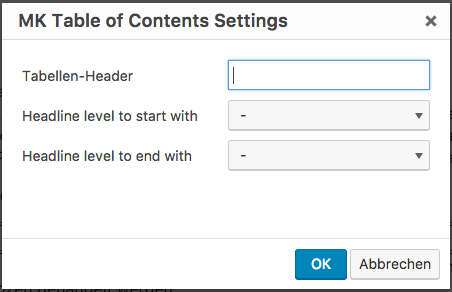
This Plugin adds a TOC to a post via the shortcode [toc]. To enter the shortcode with serveral options, the plugin insert a new button into the TinyMCE with a dialog, which easily allows to configure the [toc]-shortcode.
Look also at http://blog.moritzkanzler.de/portfolio/mk-table-of-contents/ for more informations.
Снимки на разширението

<h2> to ‘
Инсталиране
- Upload the plugin files to the `/wp-content/plugins/mk-toc directory, or install the plugin through the WordPress plugins screen directly.
- Activate the plugin through the ‘Plugins’ screen in WordPress.
- Use the button in the TinyMCE insert a
[toc]-shortcode.
ЧЗВ
- Installation Instructions
-
- Upload the plugin files to the `/wp-content/plugins/mk-toc directory, or install the plugin through the WordPress plugins screen directly.
- Activate the plugin through the ‘Plugins’ screen in WordPress.
- Use the button in the TinyMCE insert a
[toc]-shortcode.
- How can I ask the developer any questions?
-
The easiest way is to open up an issue at the github page for this project: https://github.com/Mo0812/mk-toc
Отзиви
There are no reviews for this plugin.
Сътрудници и разработчици
“MK Table of Contents” е софтуер с отворен код. Към разширението са допринесли следните хора:
Сътрудници
Превеждане на “MK Table of Contents” на вашия език.
Имате интерес към разработване?
Преглеждане на кода, разглеждане на SVN хранилище, или абонамент към програмната история (log) чрез RSS.
Списък с промени
1.0
- Inital Publishing
1.1
- Updated the plugins author information
2.0
- added clean shortcode output from tinymce when not all options are choosed
2.1
- Support for german language in settings
2.2
- Cleaned Plugin Title in the plugins overview