Към съдържанието
WordPress.org

България

  • Теми
  • Разширения
  • Новини
  • Поддръжка
  • За WordPress
  • Превод на български
  • Slack
  • Get WordPress
Get WordPress
WordPress.org

Plugin Directory

WP ShareX

  • Submit a plugin
  • My favorites
  • Log in
  • Submit a plugin
  • My favorites
  • Log in

Това разширение не е обновявано повече от 2 години. Може вече да не се поддържа и да има проблеми със съвместимостта при използването му на по-нови версии на WordPress.

WP ShareX

От joomdev
Изтегляне
  • Детайли
  • Оценки
  • Инсталиране
  • Разработка
Поддръжка

Описание

WP ShareX is an advanced WordPress Social Share plugin enables you to add social share buttons on Posts and pages. You can assign buttons on Top of the Content, Bottom of the Content, Sidebar and on media.

Features of WP Social Share by JoomDev
1. 24 Social Network
2. You have the option to select either Icons or Icons with Text
3. 3 Button Shapes
4. 4 Button Animations
5. URL Shortening Option with Bitly and Goo.gl
6. Embed Twitter Handle and desired tags with Tweet
7. 4 Button display Location e.i. Top of the Content, Bottom of the content, Media, and Sidebar
8. Hide On Mobile Ability
9. Default Share Count Option. (You can play with your user’s mind)
10. Encourage your Audience to share your content with Share Incentive Feature

Снимки на разширението
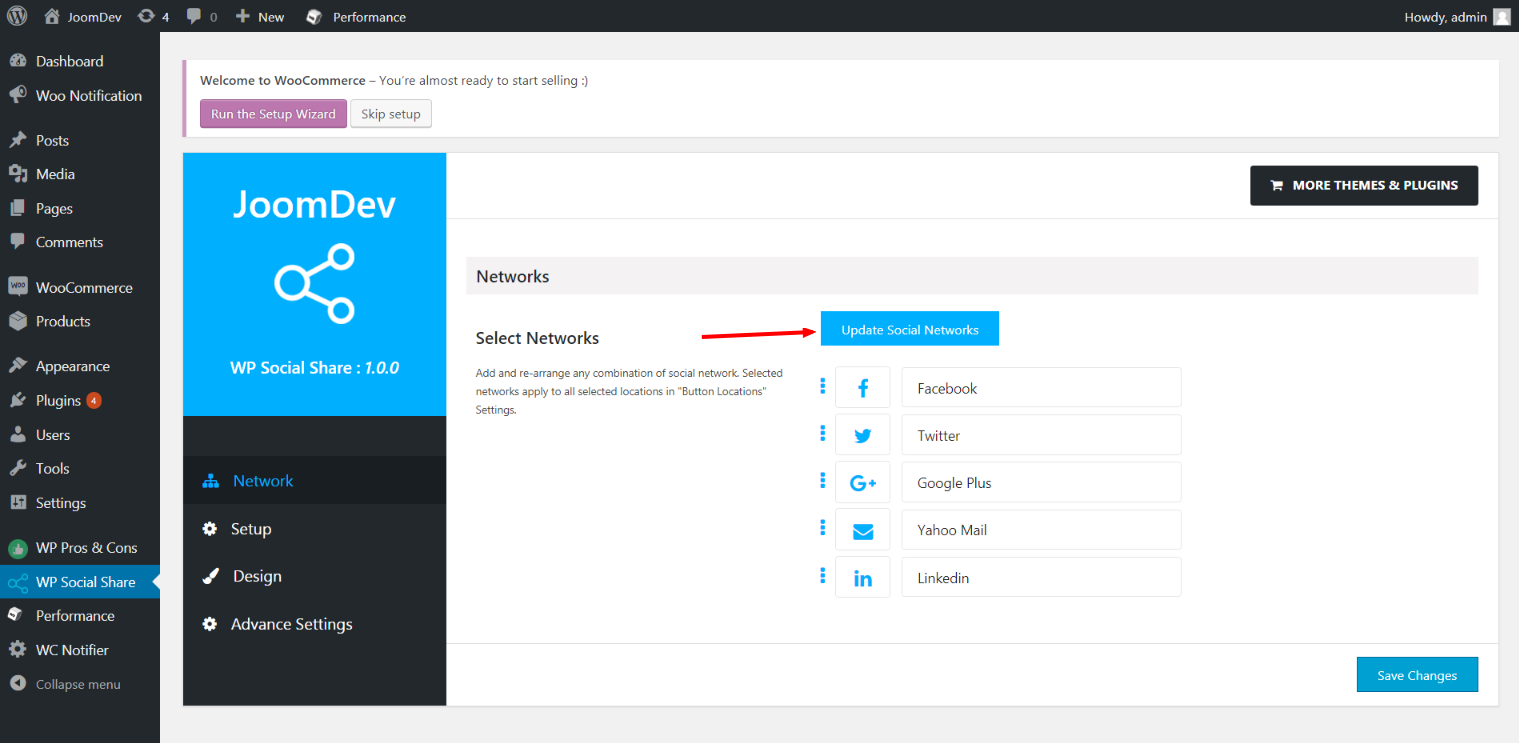
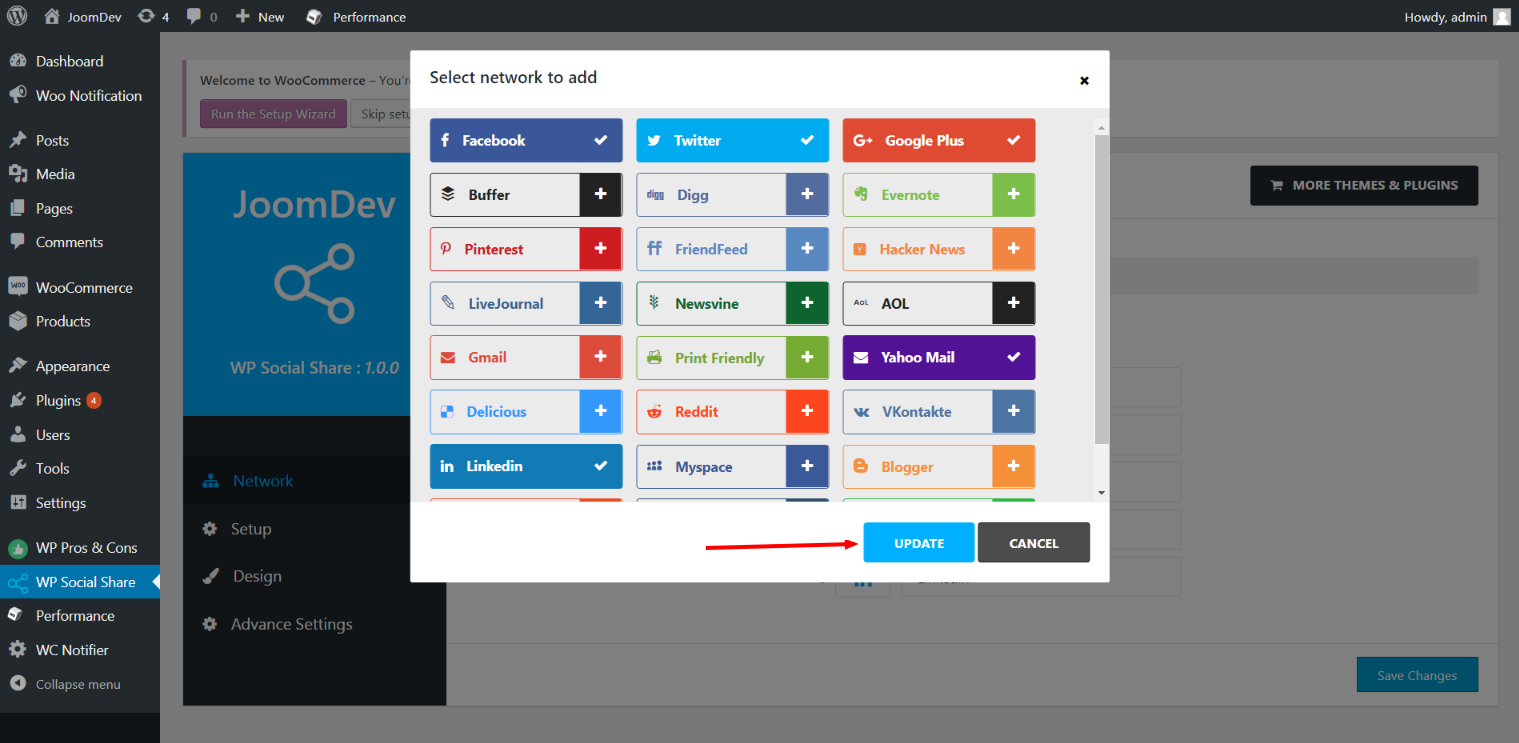
Click here to select networks
Update networks after selecting them.
Setup plugin and api settings.
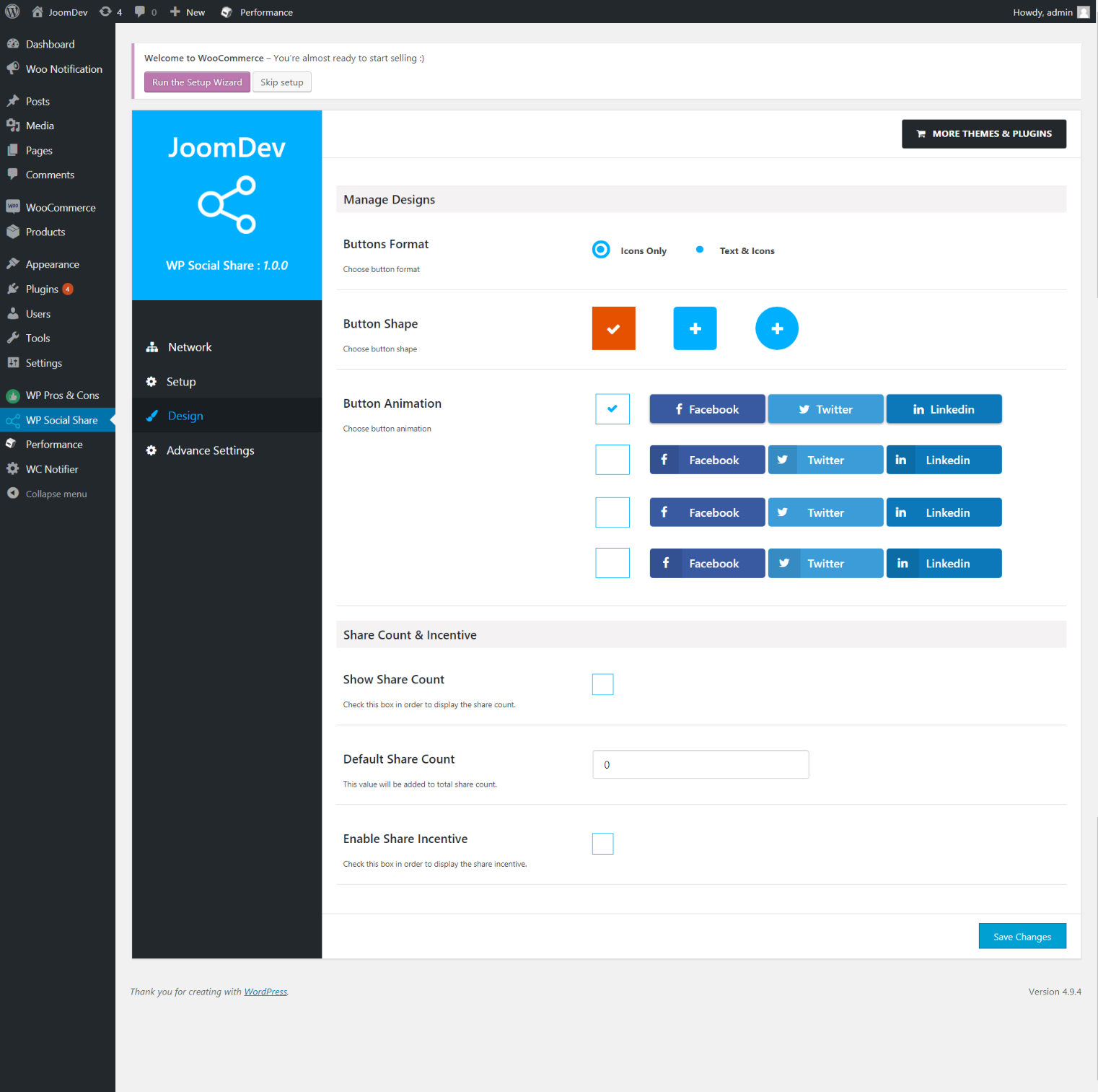
Select any design to display the buttons.
For mobile
For mobile

Инсталиране

Way 1: 1. Upload joomdev-wp-social-share.zip to the /wp-content/plugins/ directory 2. Extract the zip file. 3. Activate the plugin from wordpress plugins page. And you have done.

Way 2: 1. Go to plugins page in admin. 2. Click on Add New button. 3. Search for „WP ShareX“. 4. Click install on WP Social Share. 5. Activate the plugin.

ЧЗВ

Installation Instructions

Way 1:
1. Upload joomdev-wp-social-share.zip to the /wp-content/plugins/ directory
2. Extract the zip file.
3. Activate the plugin from wordpress plugins page. And you have done.

Way 2:
1. Go to plugins page in admin.
2. Click on Add New button.
3. Search for „WP ShareX“.
4. Click install on WP Social Share.
5. Activate the plugin.

How do I use this plugin?

See description.

Отзиви

Excellent!

Arnab Mohapatra 16.03.2018 1 reply
Incredible plugin. It allows to add any sharing button on the page simply and fast!
Прочетете 1 отзив

Сътрудници и разработчици

“WP ShareX” е софтуер с отворен код. Към разширението са допринесли следните хора:

Сътрудници
  • joomdev

Превеждане на “WP ShareX” на вашия език.

Имате интерес към разработване?

Преглеждане на кода, разглеждане на SVN хранилище, или абонамент към програмната история (log) чрез RSS.

Списък с промени

1.0.0

  • New Plugin initialized.

Мета

  • Version 1.0.0
  • Last updated Преди 8 години
  • Active installations 10+
  • WordPress version 3.0 или по-висока
  • Tested up to 4.9.29
  • Language
    English (US)
  • Tags
    sharesocialsocial share
  • Разширен изглед

Оценки

5 out of 5 stars.
  • 1 5-star review 5 stars 1
  • 0 4-star reviews 4 stars 0
  • 0 3-star reviews 3 stars 0
  • 0 2-star reviews 2 stars 0
  • 0 1-star reviews 1 star 0

Your review

See all reviews

Сътрудници

  • joomdev

Поддръжка

Имате да кажете нещо? Имете нужда от помощ?

Разглеждане на форумите за поддръжка

Дарение

Бихте ли желали да подкрепите успеха на разширението?

Направете дарение за това разширение

  • За нас
  • Новини
  • Хостинг
  • Поверителност
  • Showcase
  • Теми
  • Разширения
  • Макети
  • Learn
  • Поддръжка
  • Developers
  • WordPress.tv ↗
  • Включете се
  • Events
  • Donate ↗
  • Five for the Future
  • WordPress.com ↗
  • Matt ↗
  • bbPress ↗
  • BuddyPress ↗
WordPress.org
WordPress.org

България

  • Visit our X (formerly Twitter) account
  • Visit our Bluesky account
  • Visit our Mastodon account
  • Visit our Threads account
  • Посетете нашата страница във Facebook
  • Посетете нашия профил в Instagram
  • Посетете нашия профил в LinkedIn
  • Visit our TikTok account
  • Visit our YouTube channel
  • Visit our Tumblr account
Кодът е поезия.
The WordPress® trademark is the intellectual property of the WordPress Foundation.