
Описание
WPvivid Backup & Migration Plugin offers backup, migration, and staging (create a staging site on a subdirectory to safely test WordPress, plugins, themes and website changes) as basic features.
WPvivid Backup & Migration for MainWP
WPvivid Backup & Migration for MainWP is now available to download.
WPvivid Backup & Migration for MainWP allows you to set up and control WPvivid Backup & Migration plugins for all child sites directly from your MainWP dashboard.
WPvivid Backup & Migration Pro is Now Available
- Customize everything to backup
- Create staging sites and push staging sites to live
- Incremental backups
- Database backup encryption
- Auto backup WordPress, themes, and plugins
- WordPress multisite backup
- WordPress multisite staging
- Създаване на прясна WP инсталация
- Advanced remote backups
- Advanced backup schedules
- Restore remote backups
- Migrate a site via remote storage
- Мигриране на дъщерен сайт (MU) към едениченна WordPress инсталация
- White label WPvivid Backup & Migration Pro
- Control user access to WPvivid Backup & Migration Pro
- Повече удивителни функции
See a review video on WPvivid Backup & Migration Pro:
Get WPvivid Backup & Migration Pro
Core Features
Лесни копия
Easily create a backup of your WordPress site. You can choose to backup the entire site(database+files), all files, or database only.
Автоматична миграция
Clone and migrate your WordPress site to a new domain with a single click. WPvivid Backup & Migration Plugin supports site migration from dev environment to a new server, from dev environment to a new domain or from a live server to another.
Създаване на огледален сайт
Създайте огледален сайт в под-директория на вашият работещ сайт за безопастно тестване на WordPress Плъгини, шаблони и промени по уебсайта. Вие мобете да изберете какво да копирате от работещия сайт към огледалния сайт.
Планирани копия
Set a schedule to run backups automatically on your website. You can set the backups to run every 12 hours, daily, weekly, fortnightly, monthly, choose backup items and destination.
5. Offsite Backup to Remote Storage
Send your backups offsite to a remote location. WPvivid Backup & Migration Plugin supports the leading cloud storage providers: Dropbox, Google Drive, Amazon S3, Microsoft OneDrive, DigitalOcean Spaces, FTP and SFTP.
6. One-Click Restore
Restore your WordPress site from a backup with a single click.
7. Cloud Storage Supported
WPvivid Backup & Migration plugin supports Dropbox, Google Drive, Microsoft OneDrive, Amazon S3, DigitalOcean Spaces, SFTP, FTP. WPvivid Backup & Migration Pro also supports Wasabi, pCloud, Backblaze, WebDav and more.
Minimum Requirements to use WPvivid Backup & Migration plugin
- Character Encoding UTF-8
- PHP version 5.3
- MySQL version 4.1
- WordPress 4.5
Снимки на разширението
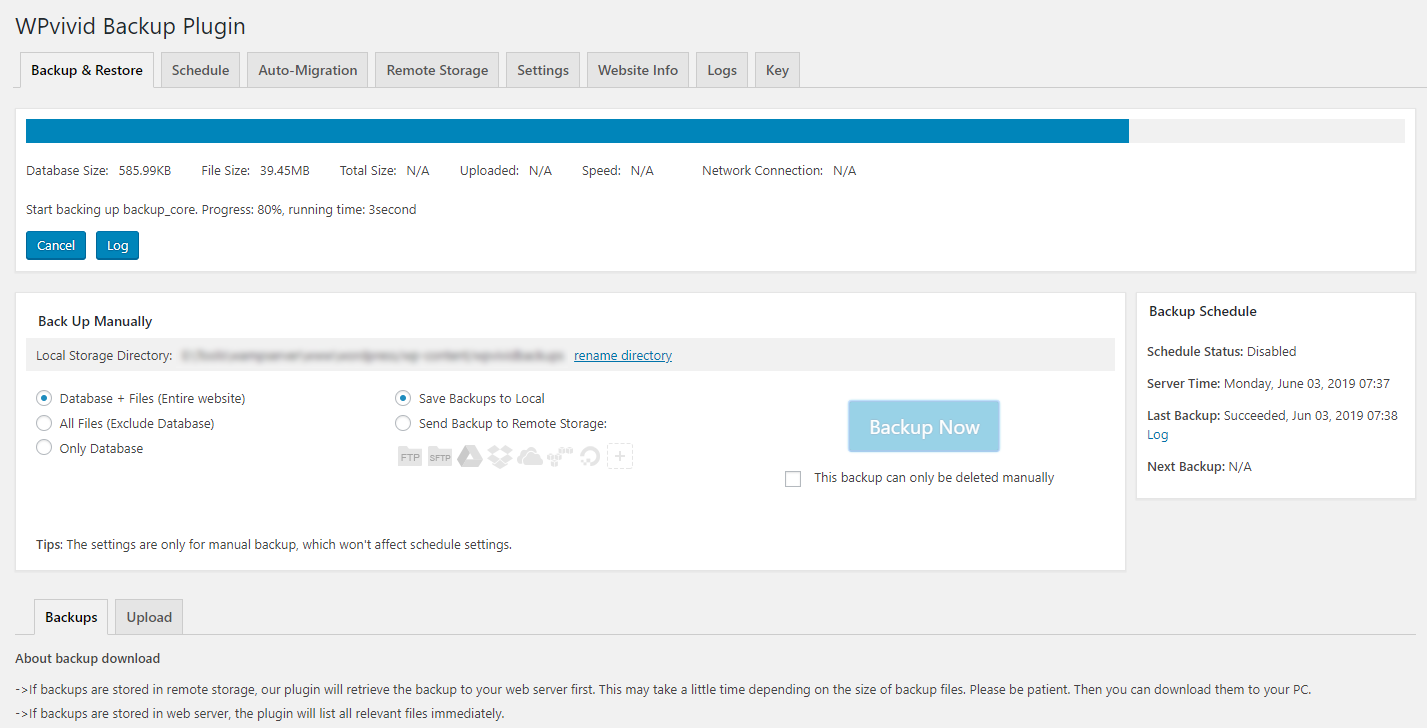
Backing up a site 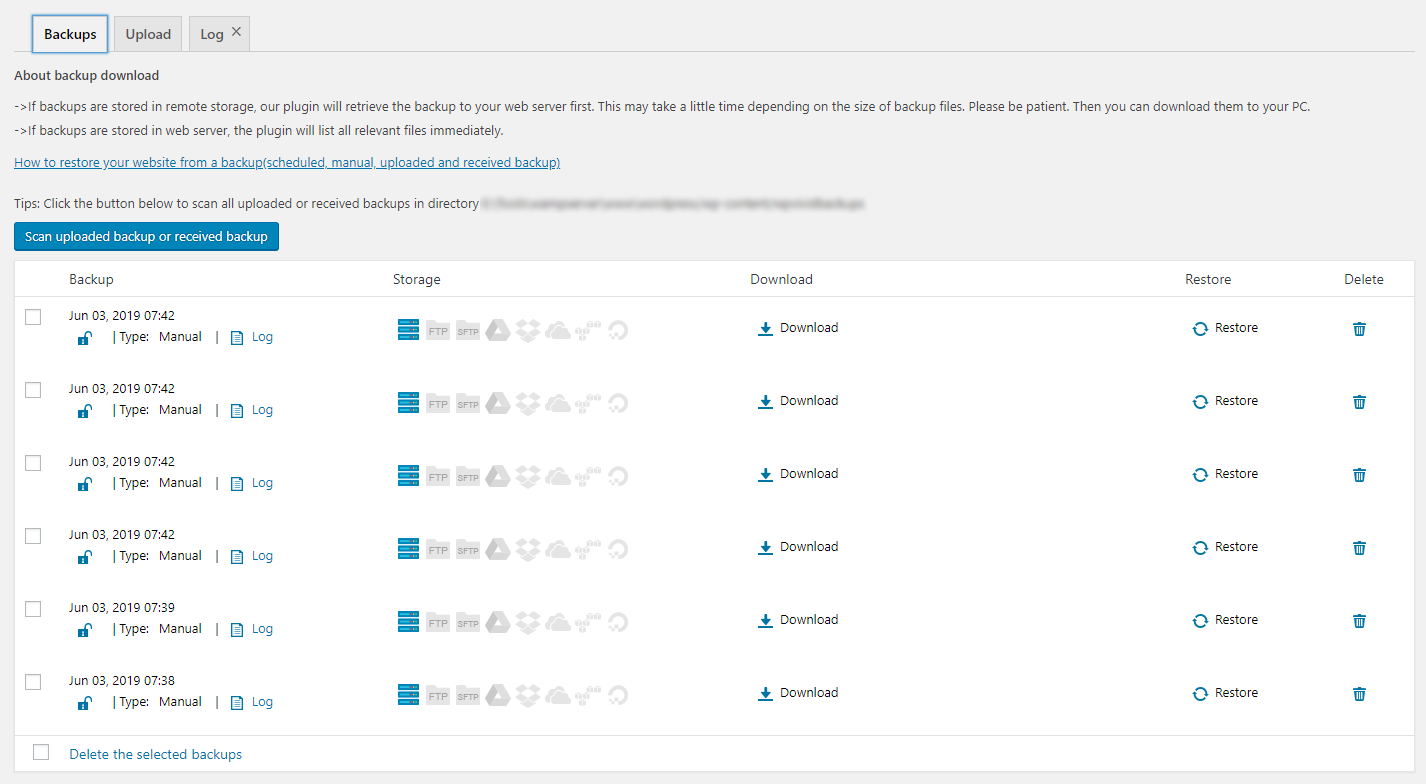
Backup list 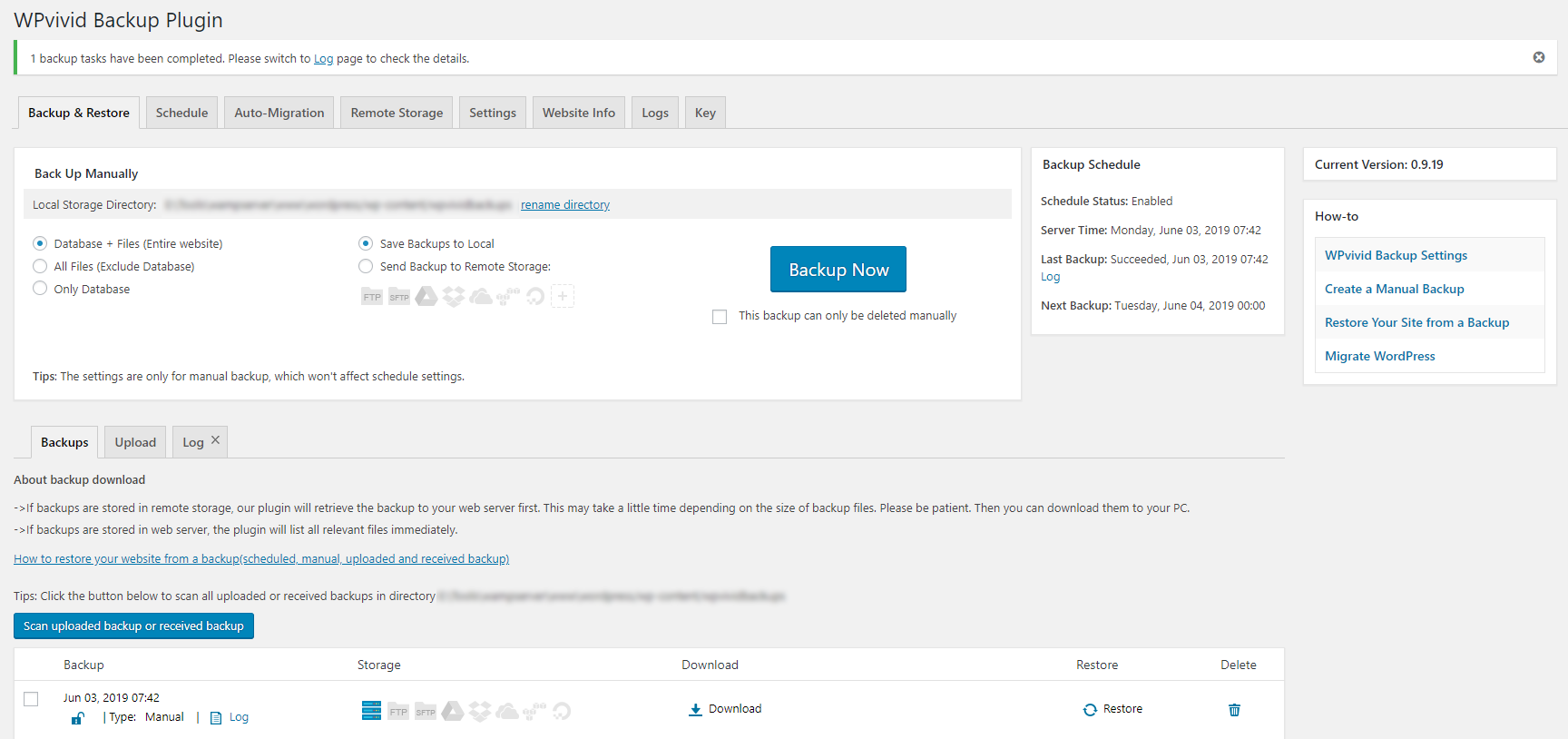
WPvivid Backup & Migration plugin Dashboard 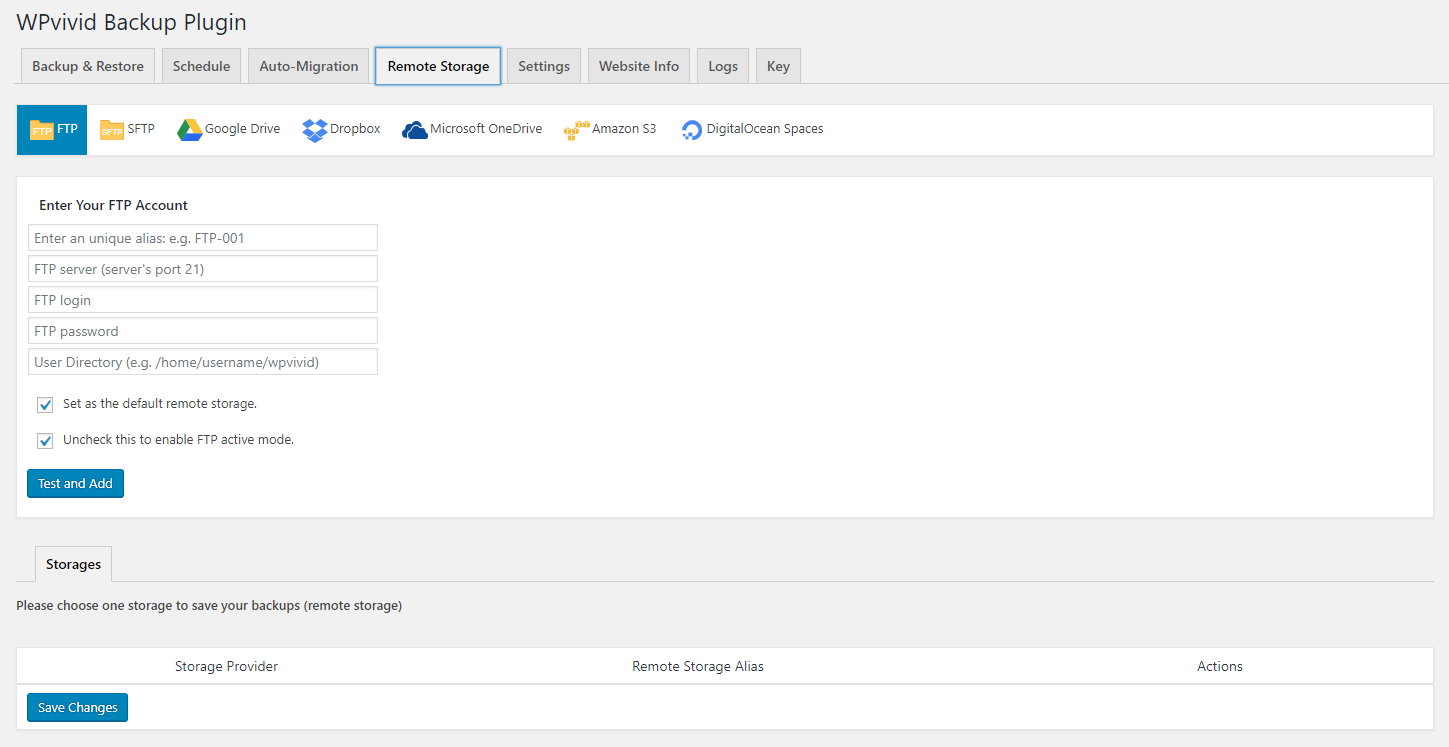
Configure remote backups 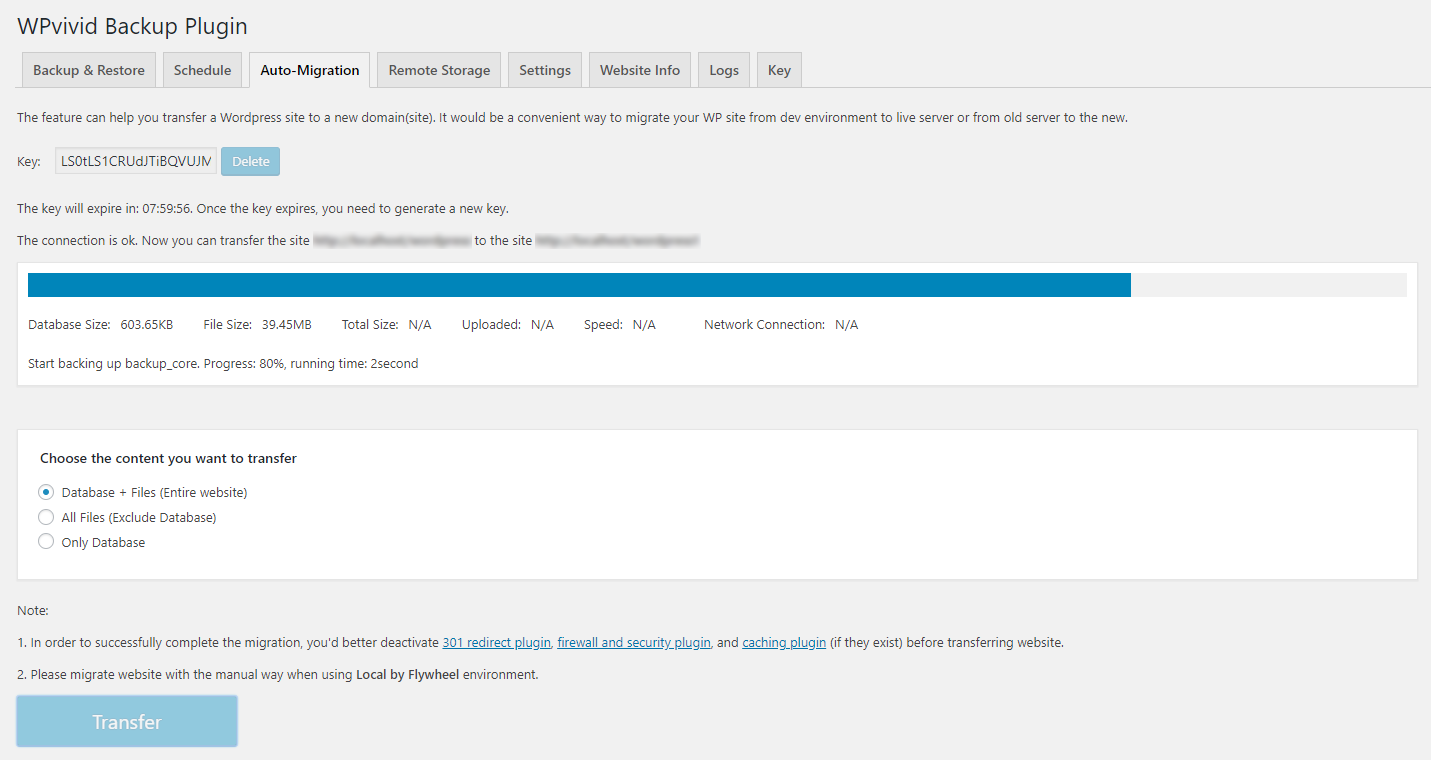
Migrate a WordPress site to a new domain 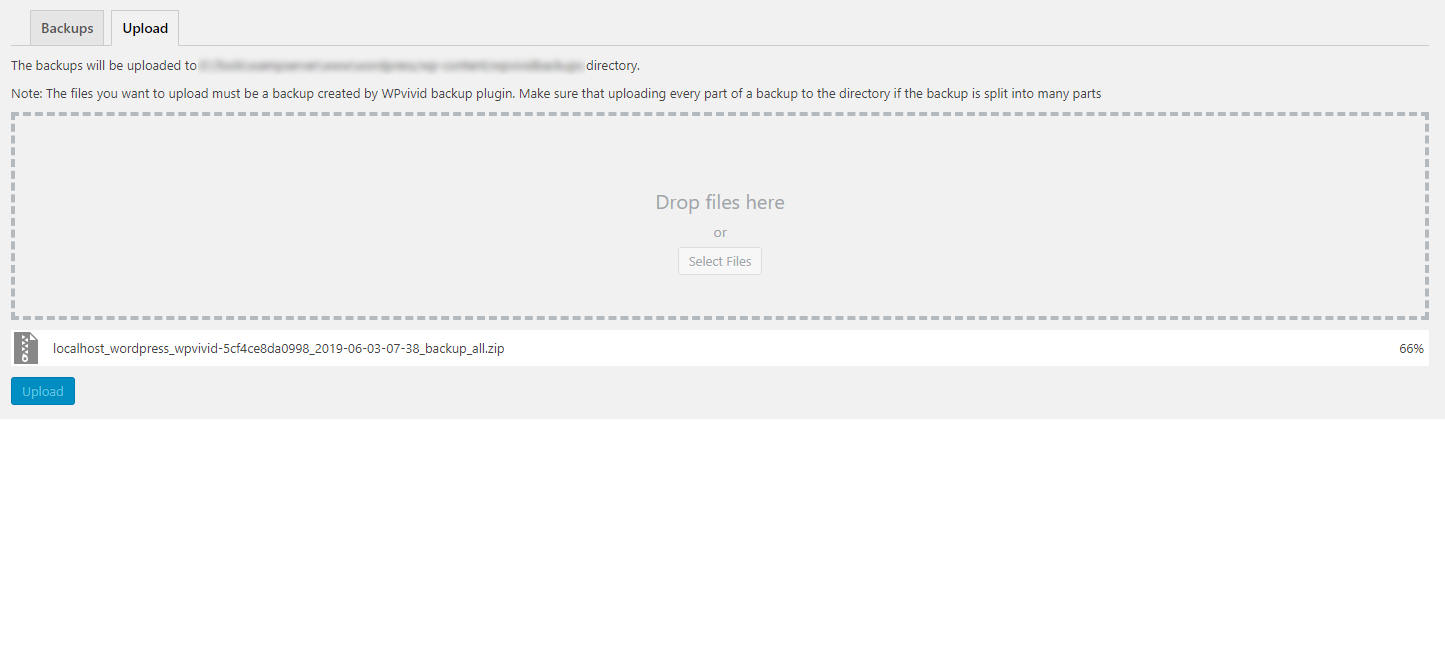
Upload a backup to restore or migrate
Инсталиране
Install WPvivid Backup & Migration Plugin
1.Go to your sites admin dashboard.
2.Navigate to Plugins Menu and search for WPvivid Backup & Migration.
3.Find WPvivid Backup & Migration and click Install Now.
4. Click Activate.
ЧЗВ
-
What does WPvivid Backup & Migration Plugin do?
-
As the name says, WPvivid Backup & Migration Plugin is an all in one free WP backup & migration plugin that enables you to easily clone and migrate a WordPress site to a new domain, to perform manual backups and schedule automatic backups of your WordPress site, to backup to cloud storage and restore backups directly from your sites admin dashboard.
-
Does WPvivid Backup & Migration Plugin also migrate my site? Is it a free feature?
-
Yes, WPvivid Backup & Migration Plugin supports migration of a WordPress site.
Yes, the migration feature is completely free. -
How many cloud options does WPvivid Backup & Migration Plugin support? Are they free to access?
-
Out of the box WPvivid Backup & Migration Plugin supports Dropbox, Google Drive, Amazon S3, Microsoft OneDrive, DigitalOcean Spaces, FTP, and SFTP.
Yes, all the cloud access is free. -
Can I use WPvivid Backup & Migration Plugin to restore my site?
-
Yes, you can use WPvivid Backup & Migration Plugin to restore a WordPress site from a backup. With no limits, no strings attached.
-
Do you provide support for WPvivid Backup & Migration Plugin? Where?
-
Yes, absolutely. Whenever you need help, start a thread on the support forum for WPvivid Backup & Migration Plugin, or contact us.
-
Do you have any get-started guides/docs?
-
Yes, we do. Here are the guides for migrating your site to a new host, creating a manual backup, restoring your site from a backup, and more on our docs page.
Отзиви


Сътрудници и разработчици
“Мигриране, бекъп, огледално копие – WPvivid” е софтуер с отворен код. Към разширението са допринесли следните хора:
Сътрудници
“Мигриране, бекъп, огледално копие – WPvivid” е преведено на 37 езика. Благодарности на преводачите за техния принос.
Превеждане на “Мигриране, бекъп, огледално копие – WPvivid” на вашия език.
Имате интерес към разработване?
Преглеждане на кода, разглеждане на SVN хранилище, или абонамент към програмната история (log) чрез RSS.
Списък с промени
0.9.101
- Fixed: Retention settings did not work for scheduled backups.
- Fixed: Scanning unused images would fail in some cases.
0.9.100
- Added a column to the backup list to show the backup size.
- Fixed: URLs could not be replaced during migration in some cases.
- Fixed: Adding SFTP remote storage could fail in some cases.
- Fixed a vulnerability in the plugin code.
0.9.99
- Fixed: Scheduled database backups could fail in some cases.
- Optimized the plugin code.
- Successfully tested with WordPress 6.5.
0.9.98
- Fixed: Backups to OneDrive failed in some environments.
- Fixed some PHP warnings.
- Optimized the plugin code.
0.9.97
- Fixed some vulnerable code and optimized the plugin code.
- Fixed: The option ‘Keep backups in local after uploading them to cloud’ could not take effect.
- Successfully tested with WordPress 6.4.3.
0.9.96
- Fixed: Restore could fail when max_allowe_packet of the server is low.
- Fixed some bugs in the plugin code.
- Optimized the plugin code.
- Successfully tested with WordPress 6.4.3.
0.9.95
- Fixed: Backup to SFTP would fail in some environments.
- Fixed: Backup to Google Drive would fail in some environments.
- Fixed: Creating a staging site would fail in some cases.
- Fixed: Some special characters would not display properly after website migration.
- Fixed some vulnerabilities in the plugin code.
- Fixed some bugs in the plugin code.
- Optimized the plugin code.
0.9.94
- Fixed: Prefix of tables with foreign keys would not be replaced in a migration process.
- Fixed: Corrupted backups would not be detected in some environments.
- Fixed some bugs in the plugin code.
- Optimized the plugin code.
0.9.93
- Added support for migration of sites without a database prefix.
- Fixed some bugs in the plugin code.
- Optimized the plugin code.
0.9.92
- Fixed a vulnerability in the plugin code.
- Fixed some bugs in the plugin code.
- Optimized the plugin code.
0.9.91
- Fixed: Error logs would not be attached to backup email reports.
- Fixed: Uploading backups to OneDrive would fail in some environments.
- Fixed a compatibility issue with JetBackup plugin.
- Fixed some vulnerabilities in the plugin code.
- Fixed some bugs in the plugin code.
- Optimized the plugin code.
0.9.90
- Successfully tested with WordPress 6.3.
- Fixed: restore would fail when a backup contained zero dates ‘0000-00-00’.
- Fixed: Customized site icons and logos would be falsely scanned as unused.
- Added an option to exclude folders from unused image scan.
- Fixed some bugs in the plugin code.
- Optimized the plugin code.
0.9.89
- Excluded backup-migration and backups-dup-lite from a backup.
- Fixed some bugs in the plugin code.
- Optimized the plugin code.
0.9.88
- Fixed: Database restoration would fail in some environments.
- Fixed: Staging creation would fail when the database contained the aiowps_debug_log table.
- Fixed a library conflict with the Skaut Google Drive Gallery plugin.
- Fixed some PHP warnings that appeared on sites with newer PHP versions.
- Fixed some bugs in the plugin code.
- Optimized the plugin code.
0.9.87
- Fixed: Uploading backups to GoogleDrive failed because of an ‘invalid credential’ error in some cases.
- Fixed: Backup email report did not display properly in Outlook emails.
- Fixed some PHP warnings that appeared on sites with newer PHP versions.
- Fixed: Non admin users could see the plugin menus in the top admin bar.
- Fixed: Locked backups would not be deleted by backup retention.
- Fixed some bugs in the plugin code.
- Optimized the plugin code.
0.9.86
- Fixed a library conflict with the ElementsKit plugin.
- Fixed a library conflict with the YaySMTP plugin.
- Fixed some bugs in the plugin code.
- Optimized the plugin code.
0.9.85
- Added breakpoint resume for GoogleDrive, OneDrive and Dropbox upload.
- Optimized the process of uploading backups to cloud storage.
- Fixed some bugs in the plugin code.
- Optimized the plugin code.
0.9.84
- Upgraded the version of guzzlehttp/psr7 library in the plugin to 1.8.4.
- Fixed a bug of false positive backup failed email notifications.
- Fixed: Backup to Dropbox failed in some environments.
- Fixed a PHP warning of ‘WPvivid_S3Request’.
- Fixed: some used images were falsely scanned as unused.
- Fixed some UI bugs.
- Fixed some bugs in the plugin code.
- Optimized the plugin code.
0.9.83
- Upgraded the backup and restore engine to improve the backup and restore success rate.
- Fixed some bugs in the plugin code.
- Fixed some UI bugs.
- Optimized the plugin code.
0.9.82
- Fixed: Backup failed when php_uname is disabled on the server.
- Fixed: ‘Quick Snapshot’ did not work on non-wpvivid pages.
- Fixed some PHP warnings on PHP 8.2 sites.
- Fixed some bugs in the plugin code.
- Optimized the plugin code.
0.9.81
- Fixed the compatibility issue with servers that have phpinfo() function disabled.
- Fixed some bugs in the plugin code.
- Optimized the plugin code.
0.9.80
- Optimized backup process on Litespeed web server.
- Staging error logs were not included in the Debug zip.
- Fixed some bugs in the plugin code.
- Optimized the plugin code.
- Successfully tested with WordPress 6.1.1.
0.9.79
- Fixed: All target pages except for home page showed 404 error in some cases after migration.
- Fixed some bugs in the plugin code.
- Optimized the plugin code.
- Successfully tested with WordPress 6.1.
0.9.78
- Added an option to create quick database snapshots.
- Added a check for siteurl and home in a restore process.
- Fixed: Some used images were falsely scanned as unused.
- Fixed some bugs in the plugin code and optimized the plugin code.
0.9.77
- Updated: Transferred files will be deleted automatically when auto migration fails.
- Fixed a vulnerability in the plugin code.
- Fixed some bugs in the plugin code.
- Optimized the plugin code.
0.9.76
- Added a check to the integrity of uploaded backups.
- Fixed a vulnerability in the plugin code.
- Fixed some bugs in the plugin code.
- Optimized the plugin code.
0.9.75
- Fixed: Page styling got lost after importing the page in some cases.
- Fixed: Some used images were falsely scanned as unused.
- Fixed some UI bugs.
- Fixed some bugs in the plugin code and optimized the plugin code.
0.9.74
- Fixed some i18n issues in the plugin code.
- Updated: Last backup time will be updated once the backup schedule is triggered.
- Fixed some bugs in the plugin code.
- Optimized the plugin code.
0.9.73
- Fixed some bugs in the plugin code and UI.
- Optimized the plugin code.
- Successfully tested with WordPress 6.0.
0.9.72
- Improved the upload function. Now when uploading a zip(part) failed, you will be notified immediately, and you can continue to upload the problematic zip rather than uploading all zips again.
- Added: Cloud storage credentials in the database are encrypted now.
- Changed: Cloud storage credentials are not showing in the storage edit page.
- Fixed: Selected themes were not copied when creating a fresh install in some cases.
- Fixed the wpvivid_request error that could appear in some cases when scanning unused images.
- Fixed: some used images were falsely scanned as unused.
- Optimized the plugin code to reduce server consumption.
- Fixed some bugs in the plugin code.
0.9.71
- Fixed the warning: Undefined array key „page“ when editing pages in some cases.
- Fixed: Creating a fresh install failed when Elementor plugin is enabled.
- Fixed some vulnerabilities in the plugin code.
- Fixed some UI bugs.
- Fixed some bugs in the plugin code.
0.9.70
- Fixed: There was no notification after restoration in some environments.
- Fixed some vulnerabilities in the plugin code.
- Fixed: Backup information of live site would be copied to the staging site when creating a staging site.
- Changed staging site creation time to local time.
- Fixed some bugs in the plugin code.
- Successfully tested with WordPress 5.9.2.
0.9.69
- Updated: For security reasons, adding Google Drive, Dropbox, OneDrive now needs to get authentication first.
- Updated: Changed time in a log file to local time.
- Fixed the curl 60 error that could appear when backing up to Google Drive in some cases.
- Fixed: Disabling backup splitting did not take effect on PHP 8 sites.
- Fixed: Uploading backups to Dropbox failed in some cases.
- Fixed some bugs in the plugin code.
- Optimized the plugin code.
0.9.68
- Fixed: Failed to upload backups to Dropbox in some cases.
- Updated: Changed timezone in email report title to local time.
- Optimized the plugin code.
0.9.67
- Fixed: The object-cache.php file and protection files generated by Wordfence were not excluded during restore.
- Fixed: Some used images were falsely identified as unused.
- Added creation time for a staging site.
- Optimized the plugin code.
0.9.66
- Fixed a Dropbox folder bug.
- Fixed a conflict between the unused image cleaner and some themes.
- Fixed a problem that some used images in Elementor were identified as unused.
- Fixed: Downloading backup would failed in some cases.
- Added a check to Nginx server when creating a staging site.
- Optimized the plugin code.
0.9.65
- Fixed: Some WPvivid Backup Plugin settings were reset to default after restore.
- Fixed: Some urls could not be replaced because of escape format problems after restore.
- Fixed: Unused image could not be scanned in PHP 8.
- Fixed: Staging site admin url did not display correctly when the live site has a ‘custom login url’.
- Optimized the plugin code.
0.9.64
- Fixed: Failed to refresh Dropbox token in some cases.
- Fixed: Custom menu style could not be properly migrated in some cases.
- Optimized the process of creating a staging site.
- Added an option to resume the task of creating a staging site when it was interrupted.
- Optimized the plugin code.
0.9.63
- Added support for Dropbox’s new API.
- Fixed: some images used in Elementor would be scanned as ‘unused’.
- Fixed some bugs in the plugin code.
- Optimized the plugin code.
0.9.62
- Added a check to the permissions of the staging folder before creating a staging site.
- Fixed some bugs in the plugin code.
- Optimized the plugin code.
- Successfully tested with WordPress 5.8.1.
0.9.61
- Added support for migration of unconventional save of the media paths.
- Fixed some bugs in the plugin code.
- Optimized the plugin code.
0.9.60
- Fixed: Failed to back up files of 0 KB in PHP 8 environment.
- Changed: The information of backup folder name will not be included when you export the plugin settings.
- Fixed some bugs in the plugin code.
- Optimized the plugin code.
0.9.59
- Fixed the PHP Guzzle library support compatibility issue which could cause backup failure in some cases.
- Fixed some bugs in the plugin code.
- Optimized the plugin code.
0.9.58
- Fixed a fatal error with the last update.
0.9.57
- Added a new feature of creating a staging site.
- Fixed some bugs in the plugin code.
- Optimized the plugin code.
0.9.56
- Fixed: Some used images would show up in the image cleaner results in some cases.
- Fixed some bugs in the plugin code.
- Optimized the plugin code.
0.9.55
- Successfully tested with WordPress 5.8.
- Fixed: Creating tables failed when restoring the database in some cases.
- Fixed some bugs in the plugin code.
- Optimized the plugin code.
0.9.54
- Added support for PHP 8.
- Fixed some bugs in the plugin code.
- Optimized the plugin code.
0.9.53
- Fixed a SQL injection vulnerability.
- Fixed some bugs in the plugin code and optimized the plugin code.
0.9.52
- Fixed a fatal error occurred during website transfer in some cases.
- Fixed some bugs in the plugin code.
- Optimized the plugin code.
0.9.51
- Added: Once a backup is created, the plugin will check whether the zip is good and will prompt you if it is corrupted.
- Fixed some bugs in the plugin code.
- Successfully tested with WordPress 5.7.
0.9.50
- Fixed some bugs in the plugin code.
- Optimized the plugin code.
- Successfully tested with WordPress 5.6.1.
0.9.49
- Fixed: A 404 error would returned when sending a request to wp-cron.php in some multilingual websites.
- Fixed: Could not turn pages in the backup list.
- Fixed some bugs in the plugin code.
- Optimized the plugin code.
0.9.48
- Redesigned the Download section for better UX.
- Fixed the insufficient permission error that occurred when authenticating FTP in some cases.
- Fixed the incorrect credential error that occurred when authenticating SFTP in some cases.
- Successfully tested with WordPress 5.6.
0.9.47
- Added support for Amazon S3 South Africa region.
- Fixed: Folder would not be backed up when it’s name matches regex: ^uploads.*$.
- Successfully tested with WordPress 5.5.3.
- Fixed some bugs in the plugin code.
- Optimized the plugin code.
0.9.46
- Fixed: Some special characters in database could not be restored properly.
- Fixed: Only 1000 backups stored on Amazon S3 could be displayed.
- Fixed: Unused image cleaner also isolated images used in CSS files.
- Successfully tested with WordPress 5.5.1.
- Fixed some bugs in the plugin code.
- Optimized the plugin code.
0.9.45
- New feature Added: Find and clean unused images in your WP media library.
- Fixed some bugs in the plugin code.
- Optimized the plugin code.
0.9.44
- Successfully tested with WordPress 5.5.
- Fixed: Refreshing Google Drive token failed in some cases.
0.9.43
- Optimized migration process.
- Fixed some bugs in the plugin code.
- Optimized the plugin code.
0.9.42
- Added Bulgarian language translation.
- Fixed a fatal error occurred during website transfer in some cases.
- Fixed some bugs in the plugin code.
- Optimized the plugin code.
0.9.41
- Added an option in the plugin settings to delete the WPvivid directory when deleting the plugin.
- Added Italian language translation.
- Optimized the plugin UI.
- Fixed some bugs in the plugin code.
0.9.40
- Fixed: Backup schedules failed in some cases.
- Excluded the session_mm_cgi-fcgi file when creating a backup.
- Fixed some bugs in the plugin code.
0.9.39
- Excluded the /wphb-cache directory when creating a backup.
- Fixed: Root directory is now forbidden to set to ‘/’ when connecting to a FTP server.
- Fixed the pagination issue in the process of exporting pages.
- Fixed some bugs in the plugin code.
0.9.38
- Successfully tested with WordPress 5.4.
- Added a new language template for translators.
0.9.37
- Changed the time in the name of the backup zip to the sites local time.
- Changed the time showed in the backup list and log list to the sites local time.
- Fixed some bugs in the plugin code.
0.9.36
- Added an option to overwrite existing pages in an import.
- Fixed: Could not retrieve posts list on a multilingual site in an export.
- Fixed some bugs in the plugin code and optimized the plugin code.
0.9.35
- Fixed a bug occurred when connecting with remote storage in some cases.
- Fixed some bugs in the plugin code.
- Optimized the plugin UI.
0.9.34
- Fixed the PHP 7.4 compatibility issue.
- Fixed: Backing up upload directory failed in some cases.
- Fixed: Backup filenames did not match the downloads part numbers.
- Updated the API for WPvivid Backup for MainWP extension.
- Fixed some bugs in the plugin code.
0.9.33
- Fixed:Replacing domain failed after migrating on servers using innodb database engine.
- Fixed: Compressed packages were lost in some cases.
- Added a column to the backup list to display backup content type.
- Temporarily removed translation files.
- Optimized the plugin code.
0.9.32
- Updated the plugin code for WPvivid Backup for MainWP extension.
- Fixed some bugs in the plugin code.
- Optimized the plugin code.
0.9.31
- Successfully tested with WordPress 5.3.2.
- Fixed: Backup could fail when the split file size was set to 0 MB in the shared hosting optimization mode.
- Fixed some small bugs in the plugin code.
- Optimized the process of restoring large amounts of data.
- Optimized the split backup file size to bring it closer to the value you set.
- Added Japanese language translation.
0.9.30
- Added an option to select database accessing method for a backup or restore process.
- Optimized plugin code and set the autoload attribute to no.
- Improved the success rate of backing up the uploads folder when the optimization mode for web hosting/shared hosting is enabled.
- Fixed some bugs in plugin code.
0.9.29
- Successfully tested with WordPress 5.3.
- Fixed: Locked backups were deleted automatically.
- Changed: Backups will now be split every 200MB by default.
- Fixed some bugs in the plugin code.
0.9.28
- New feature Added: Export and import posts or pages with images in bulk.
- Fixed: URL replacement failures after website migration in some cases.
- Fixed: Too many resumption attempts error that occurred when uploading backups in some cases.
- Fixed some bugs in the plugin code.
0.9.27
- Fixed a fatal error that could be triggered by some firewall or security plugins.
- Refined and simplified the plugin menu in admin menu and top admin bar.
- Optimized the plugin code.
- Added Polish language translation.
0.9.26
- Optimized the plugin’s UI.
- Added a new tab for downloading WPvivid Backup for MainWP.
0.9.25
- Fixed: Could not restore websites in some cases.
- Fixed: The setting of PHP version that had been changed in .htaccess was lost after restoration.
- Added an option to merge all backup files into a package when a backup completes. This can increase backup and migration success rate in a website with insufficient server resources.
- Upgraded: Amazon S3 and DigitalOcean Space have upgraded their connection methods, so you will need to delete the previous connections and re-add your Amazon S3/DigtalOcean Space accounts to make sure the connections work.
- Optimized the plugin code.
0.9.24
- Fixed some bugs in the plugin code.
- Fixed: Could not restore files to proper directories if one had customized the sites file structure.
- Fixed: The page could not properly display when one chose Remote Storage option from the admin sidebar menu.
- Optimized backup process, now it saves more disk space.
- Optimized the plugin code.
0.9.23
- Added an option to hide the plugin menu on the top admin bar.
- Fixed: Always sent email notifications even the Only send an email notification when a backup fails option was selected.
- Fixed: The plugin menu on the top admin bar is visible to all users.
- Refined some error messages.
0.9.22
- Fixed: Backup created in web hosting/shared hosting optimization mode was incomplete in some cases.
- Fixed: Backup actually failed but was reported as a success in some cases.
- Refined error messages of migration process.
- Added a notice to the situation where backup schedules were unusable because the WP Cron on the server was disabled.
- Optimized the plugin code.
0.9.21
- Fixed: Special data in some database tables could not be replaced during a restore, which would cause failure of the restore.
- Fixed: Migration between sites that have different backup storage directories would fail.
- Fixed: The error establishing database connection occurred in some cases while loading the plugin page.
- Optimized the plugin code.
0.9.20
- Added an advanced section in settings page.
- Optimized the layout of settings page and display of some settings.
- Added an option of enabling optimization mode for web hosting/shared hosting in advanced settings.
- Added a memory_limit option in advanced settings.
- Added a chunk size option in advanced settings.
- Added an option to cancel a running migration.
- Provided the WPDB as the interface with the database for the sites missing PDO_MYSQL.
- Fixed a timeout error occurred in some cases during backup process.
- Optimized the plugin code.
0.9.19
- Added a php memory limit option to settings, you can use it to temporarily increase php memory limit when encountering a memory exhausted error in backup process.
- Fixed: Backup does not exist error that occurred in some cases when downloading the backup to local.
- Fixed: Backup error that occurred when the wp-content/plugins folder on a web server was moved or renamed.
- Fixed: Restore error that occurred in some cases when restoring a backup to a different domain.
- Enhanced the clean backup cache option in settings.
- Optimized backup process.
0.9.18
- Optimized migration process, improved compatibility for migration. Old keys will be expired after you update to the new version.
- Added an option to retry the backup operation when encountering a timeout error.
- Added an option to hide settings in admin menu.
- Changed the plugin icon showing in admin menu.
- Included more info in the error log when sending to support.
- Improved compatibility with some hosting like GoDaddy.
- Optimized the cache directory in backup process.
- Fixed errors occurred in some cases during the authentication process with Google Drive, Dropbox, Microsoft OneDrive.
- Optimized plugin code.
0.9.17
- Added a sole tab for backup schedules.
- Refined descriptions in the UI.
- Fixed a few UI bugs.
- Successfully tested with WordPress 5.2.
0.9.16
- Fixed a fatal error occurred during website transfer.
0.9.15
- Fixed: Scheduled backups failed to run as configured after the last update.
- Improved the Restore UI.
- Refined some descriptions in the UI.
0.9.14
- Added free website transfer feature. We highly recommend all our users to update.
- Added backup upload feature. Now you can upload a backup to restore or transfer.
0.9.13
- Fixed: Sometimes could not correctly determine database privileges when backing up.
0.9.12
- Added an ‘Send Debug Information to Us’ button in Website Info page.
- Improved the compatibility with PHP v5.3 to v5.5.
- Fixed the compatibility issue with MainWP plugin.
- Fixed: Could not correctly calculate files size when backing up.
- Fixed: Could not back up to SFTP server sometimes.
- Fixed: Database backup failure because of insufficient privileges.
- Enriched backup logs with more details.
- Refined some descriptions on user interface.
- Optimized code of the plugin.
0.9.11
- Added support for DigitalOcean Spaces.
- Added an HTML email template to backup reports.
0.9.10
- Fixed: Some icons were missing in UI.
0.9.9
- Fixed a packaging error which might cause the failure of activating the plugin.
0.9.8
- Added support for Google Drive, Micosoft OneDrive, Dropbox cloud storage.
- Fixed: Could not restore a backup from cloud storage.
- Optimized code of the plugin.
0.9.7
- Fixed data type errors caused by the last update. The errors would cause the failure of running of scheduled backup tasks. We highly recommend you upgrade.
- Fixed a bug where the last backup information was not displayed in backup schedule list.
- Changed a few error messages that appear during the backup process.
- Optimized code of the plugin.
0.9.6
- Optimized code of the plugin.
- A more lightweight Amazon S3 library has been used, so that you do not need to fill in Region field while configuring a S3 storage account.
0.9.5
- Refined descriptions on user interface.
- Fixed a few UI bugs.
- Fixed a bug where backups were runnable in some cases during the process of a restoration.
0.9.4
- Added support for responsive design. Now the plugin is compatible with smartphones, tablets and PC.
- Fixed some UI bugs.
0.9.3
- Fixed some display errors on user interface.
- Fixed a bug where backups could not be completed in exceptional cases.
0.9.2
- Fixed image path display error.
0.9.1
- Initial release of the plugin. Now you see it.