
Описание
Includes a \“spoiler\“ button and spoiler shortcode!
Use TinyMCE with bbPress is just what it sounds like – a scaled down version of the TinyMCE editor designed specifically for bbPress.
This plugin removes the Text editor and enables TinyMCE, allowing forum members to format their message in a way that\’s more intuitive and more closely resembles other forum software.
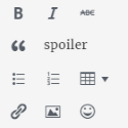
It includes buttons for:
- bold
- italic
- strikethrough
- blockquote
- spoiler button
- bulleted and numbered lists
- table support
- a bbPress-specific \“link\“ button (see below)
- insert/edit image
- emoticons
- full screen
Note: the \“insert/edit\“ link button in Use TinyMCE with bbPress is not the same button you\’re used to when it comes to editing posts and pages. It ONLY allows your forum users to include the link URL, text, title, and target. There are no options for linking to other internal posts or pages, as these options would most likely just confuse your members.
Use TinyMCE with bbPress is the forum editor I wish I\’d had when I first discovered bbPress.
Снимки на разширението


Инсталиране
Unzip and then upload the \’bbp-tinymce\’ folder to the \’/wp-content/plugins/\’ directory
Activate the plugin through the \’Plugins\’ menu in WordPress.
That\’s it! Use TinyMCE with bbPress is ready to go!
ЧЗВ
- Installation Instructions
-
-
Unzip and then upload the \’bbp-tinymce\’ folder to the \’/wp-content/plugins/\’ directory
-
Activate the plugin through the \’Plugins\’ menu in WordPress.
That\’s it! Use TinyMCE with bbPress is ready to go!
-

Сътрудници и разработчици
“Use TinyMCE with bbPress” е софтуер с отворен код. Към разширението са допринесли следните хора:
Сътрудници
Превеждане на “Use TinyMCE with bbPress” на вашия език.
Имате интерес към разработване?
Преглеждане на кода, разглеждане на SVN хранилище, или абонамент към програмната история (log) чрез RSS.
Списък с промени
1.0 – Initial release