
Снимки на разширението

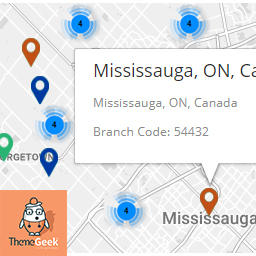
Selected location On Map, along with auto calculated longitude/latitude.
Инсталиране
- Upload
locatorLTE.zipto the/wp-content/plugins/directory - Activate the plugin through the ‘Plugins’ menu in WordPress
ЧЗВ
- Installation Instructions
-
- Upload
locatorLTE.zipto the/wp-content/plugins/directory - Activate the plugin through the ‘Plugins’ menu in WordPress
- Upload
- How to Install
-
- Upload
locatorLTE.zipto the/wp-content/plugins/directory - Activate the plugin through the ‘Plugins’ menu in WordPress
- Upload
- How to Use Plugin
-
- To use the plugin, After activating the plugin, place shortcode „[locatorlte]“ in any page.
- Plugin will show „Branches“ Tab.
- To use map service, you will need to enter Google Map API Key on locatorLTE Settings Page ( Settings > LocatorLTE Settings ).
Отзиви

22.04.2018
Like it, and the filtering by city feature is great, easy to set up.

31.03.2018
Nice plugin, had the features that i was looking for, plus it was quite easy to use, thumbs up.
Сътрудници и разработчици
“LocatorLTE – Premium Store Locator” е софтуер с отворен код. Към разширението са допринесли следните хора:
Сътрудници
Превеждане на “LocatorLTE – Premium Store Locator” на вашия език.
Имате интерес към разработване?
Преглеждане на кода, разглеждане на SVN хранилище, или абонамент към програмната история (log) чрез RSS.
Списък с промени
1.0
- Initial release
1.1
- Custom Zoom Option Added
- Custom Styles Option Added
- Clusterization Implemented
- Clusterization disable/enable option added
1.2
- Minor Bug fixes
1.3
- Filter By Cities features addition
- Map Bound Feature addition