

Описание
Quiet Link Checker finds broken links and broken images in your posts, pages, custom post types and (optionally) comments, and lets you fix them in one click.
It is called quiet because it stays out of the way: it works in the background without slowing your site, it never nags you, and it talks to no server other than the ones your links point to.
It is built around three promises:
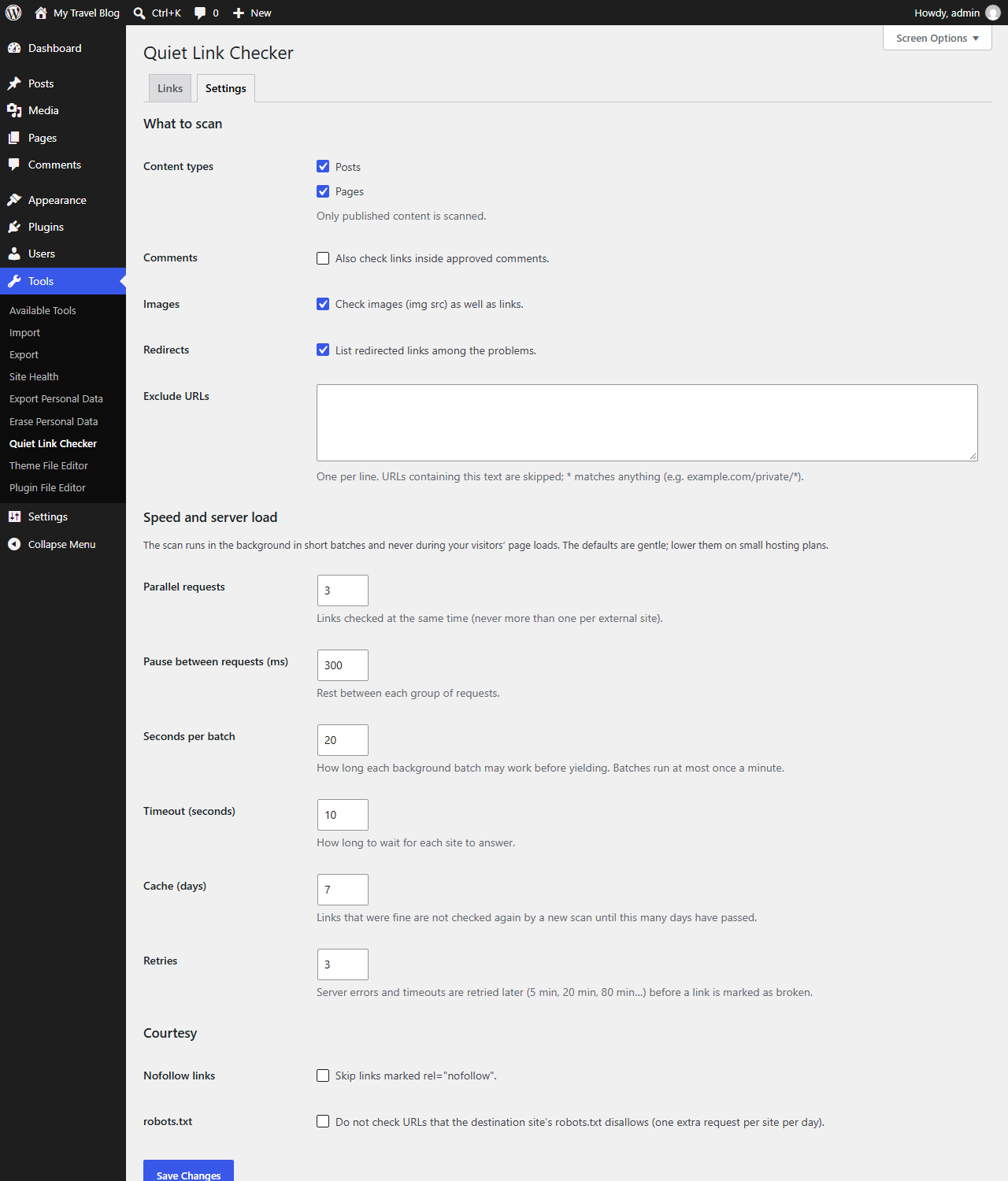
- It does not slow your site down. Checks run in the background in short, time-boxed batches, never during your visitors’ page loads. You choose how many requests run in parallel, how long each batch may work and how long to pause between requests. It never sends two requests at the same time to the same external site.
- Everything stays on your server. No account, no sign-up, no cloud service, no tracking. The only outgoing requests are the checks of the links in your own content.
- No upsell noise. No banners, no nags, no dashboard ads. The free plugin is complete.
What it checks
- Links (
<a href>) and images (<img src>) in published content of the post types you choose. - Links in approved comments (optional).
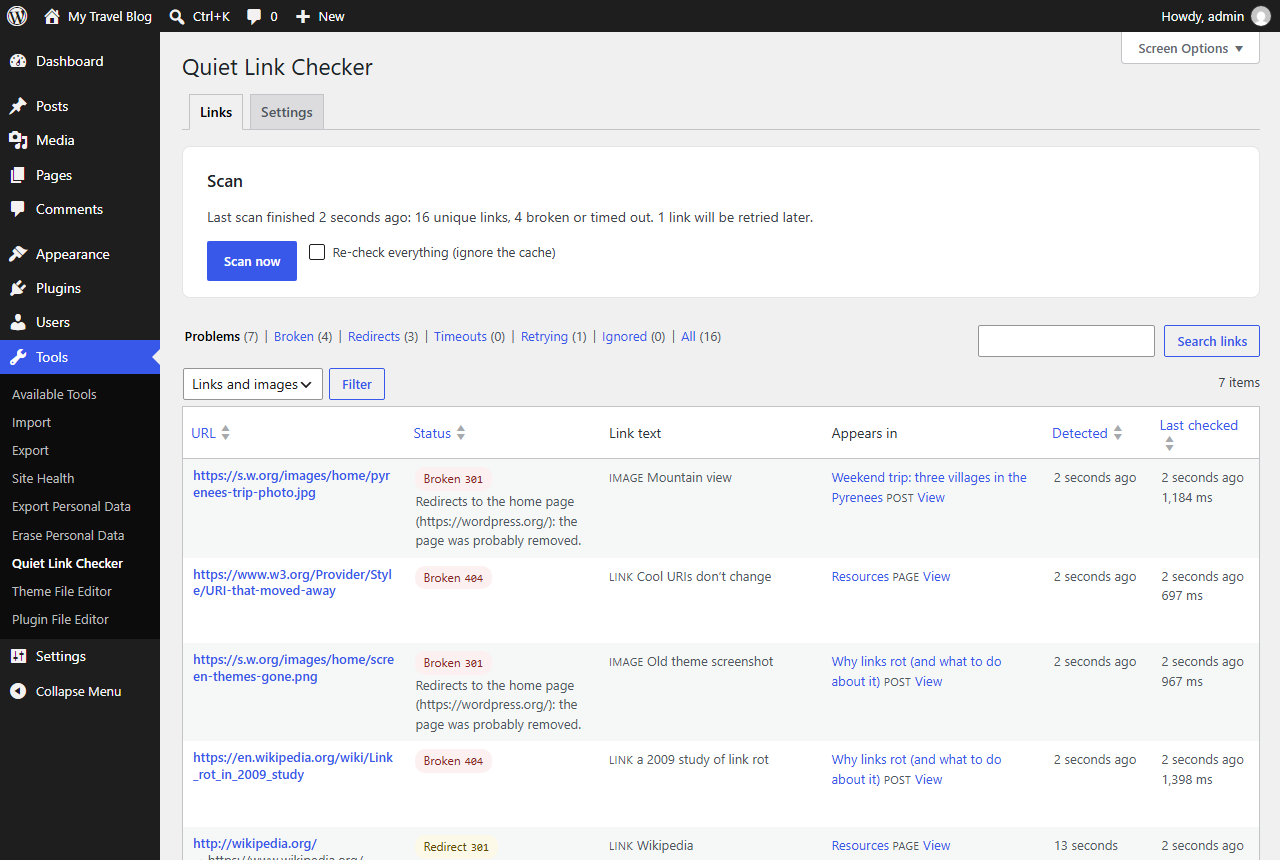
- Broken links (404, 410 and other 4xx/5xx errors), redirects (301/302…) and timeouts.
- Internal and external links. Relative URLs are resolved against each page.
How it decides a link is broken
- It sends a light
HEADrequest first and falls back toGETwhen a server does not answerHEADproperly (many reply 403/405 toHEADand 200 toGET). - 404 and 410 are reported straight away, and so are pages or images that now redirect to the site’s home page (a „soft 404“: the content was removed). Server errors (5xx), „too many requests“ (429) and timeouts are retried later with backoff (5 min, 20 min, 80 min…) before being reported, so a site that was down for a minute does not fill your list with false alarms.
- Each URL is checked once, however many pages use it, and links that worked are cached for a number of days you choose.
Quick actions
From the list of problems, for each link:
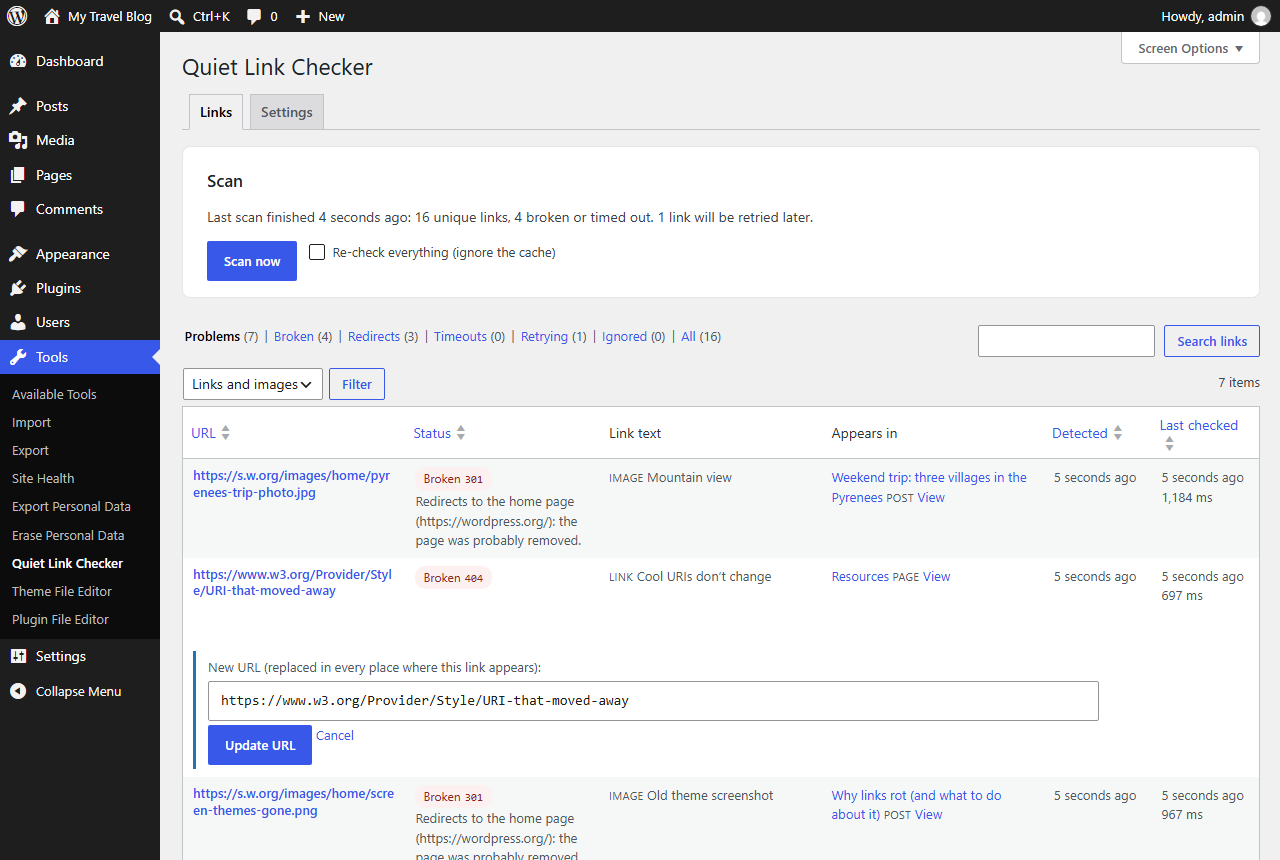
- Edit URL – replaces it everywhere it appears (all posts and comments) without touching the rest of your markup or blocks.
- Remove link – removes the link but keeps its text.
- Ignore – hides it from the problems list and stops checking it.
- Recheck – checks it again right now.
Edits are saved as normal post updates, so a revision is stored and you can always undo them from the post’s revisions.
Filters and search
Views for problems, broken links, redirects, timeouts, links being retried and ignored links; filter by links or images; search by URL or link text; sort by URL, status, detection date or last check.
Built for big sites
- Its own database tables (nothing piled into
wp_optionsorpostmeta). - Nothing is loaded on the front end and its assets only load on its own admin screen.
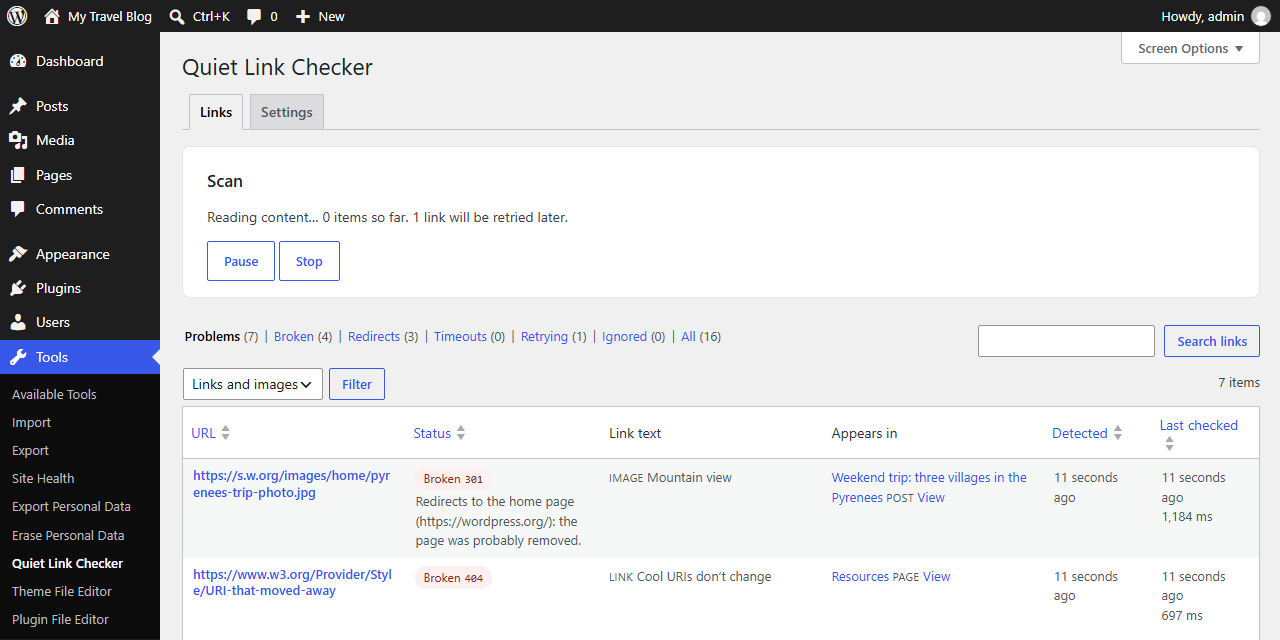
- Pause, resume or stop a scan at any time.
- WP-CLI commands for system cron on large sites:
wp quiet-link-checker scan,wp quiet-link-checker run,wp quiet-link-checker status.
Privacy
Quiet Link Checker does not collect, store or send any personal data, and it does not contact any server of its own. To check a link it requests that link’s URL from your server, as a visitor’s browser would, identifying itself with the user agent QuietLinkChecker/1.0 (+your site URL). If you enable the robots.txt option, it also requests /robots.txt from each linked site once a day.
Снимки на разширението
Инсталиране
- Install and activate the plugin from Plugins Add New, or upload the
quiet-link-checkerfolder to/wp-content/plugins/. - Go to Tools Quiet Link Checker and click Scan now.
- Leave the page if you like: the scan continues in the background. Come back to see the problems found.
Optional: in Settings choose which content types to scan, whether to include comments, and how fast to check.
On large sites, or if WP-Cron is disabled, add a system cron job that runs wp quiet-link-checker run every few minutes.
ЧЗВ
-
Will it slow down my website?
-
No. Checking happens in background batches (WP-Cron, WP-CLI, or while you have the Quiet Link Checker screen open), never while a visitor’s page is loading. Each batch has a time limit and the pace is configurable. On visitor page loads the plugin only registers its hooks: no queries, no HTTP requests, no scripts or styles.
-
Do I need an account or an API key?
-
No. There is no account, no external service and no API key. Everything runs inside your WordPress.
-
Does it send any data anywhere?
-
No telemetry and no „phone home“. The only outgoing requests are the checks of your own links.
-
How long does a scan take?
-
It depends on how many unique links you have and how fast the linked sites answer. The defaults are deliberately gentle: in our test site (2,000 posts, about 6,000 unique links) they checked about 110 links per minute, so a full first scan takes about an hour, in the background. With „Parallel requests“ at 10, no pause and 60-second batches it checked about 400 links a minute, still with no measurable slowdown for visitors. Later scans are much faster because links that worked are cached.
-
Why is a link marked „Retrying“?
-
The site answered with a temporary error (5xx, 429) or did not answer in time. Quiet Link Checker will try again later before calling it broken, to avoid false alarms.
-
Some sites (LinkedIn, sites behind bot protection) show „Access denied“
-
Some sites refuse automated requests even though the page works in a browser. Open the link to confirm and, if it works, click Ignore.
-
Can I check links on my intranet or on localhost?
-
By default, private and local network addresses are not requested (a safety measure, since comment links could point anywhere). Developers can allow them with the
quiet_link_checker_allow_unsafe_urlsfilter. -
Is it compatible with multisite?
-
Yes. Each site has its own tables and settings, and uninstalling removes the data of every site.
-
What happens when I uninstall it?
-
Its tables, options and scheduled events are removed. Deactivating only stops the background work and keeps your results.
Отзиви
There are no reviews for this plugin.
Сътрудници и разработчици
“Quiet Link Checker” е софтуер с отворен код. Към разширението са допринесли следните хора:
Сътрудници
Превеждане на “Quiet Link Checker” на вашия език.
Имате интерес към разработване?
Преглеждане на кода, разглеждане на SVN хранилище, или абонамент към програмната история (log) чрез RSS.
Списък с промени
1.0.0
- First release.